Running a successful business involves managing several moving parts, from finances and employees to customer relationships, stock, projects and daily operations. As a company grows, keeping everything organised can become increasingly challenging, particularly when information is spread across different spreadsheets, software platforms and departments.
This is where Enterprise Resource Planning (ERP) software can make a significant difference. ERP brings essential business processes together into one connected system, helping organisations work more efficiently, reduce administrative tasks and make better decisions.
Whether you operate a small business, a growing construction company or an established organisation, understanding what ERP software is and how it works can help you identify opportunities to improve your operations.
What Is ERP Software?
ERP stands for Enterprise Resource Planning. It refers to software that allows businesses to manage their core operations through a centralised platform.
Instead of using separate systems for accounting, inventory, purchasing, employees and project management, ERP software connects these functions so information can be shared across the organisation.
For example, when a company receives a customer order, an ERP system can update stock records, notify the relevant department, track associated costs and provide financial information without employees having to enter the same details repeatedly.
The purpose of ERP is not simply to replace paperwork or spreadsheets. It is to create a more organised, transparent and efficient way of running a business.
Modern ERP systems can also be customised to suit different industries, business sizes and working practices.
How Does an ERP System Work?
ERP software works by connecting business departments through shared information and coordinated processes.
Imagine a construction company managing multiple projects. Its office staff record customer enquiries, estimators prepare quotations, purchasing teams order materials, site managers monitor progress and accounts staff manage invoices.
Without an integrated system, each department may store information separately. This can cause duplicated work, communication problems and delays.
With ERP software, the information is connected. When a quotation becomes an approved project, purchasing, scheduling and financial teams can access the relevant details. As materials, labour and subcontractor costs are recorded, managers can monitor project expenditure and performance.
This creates a clearer picture of the business and makes information easier to access when decisions need to be made.
How Can ERP Software Help Your Business?
1. Improve Operational Efficiency
One of the main benefits of ERP software is improved efficiency. Businesses often spend considerable time entering data, updating spreadsheets, checking information and transferring documents between departments.
An ERP system can automate suitable routine processes and reduce unnecessary manual work.
For example, purchase orders, stock movements, customer records and project updates can be managed through connected workflows. Employees spend less time repeating administrative tasks and more time completing productive work.
2. Reduce Business Costs
Poor communication, duplicated purchases, incorrect invoices and inefficient processes can increase operating costs.
ERP software helps businesses identify these problems by improving visibility over expenditure and resources.
Managers can monitor purchasing, labour costs, inventory and project budgets more effectively. Better information allows them to identify unnecessary spending and take corrective action earlier.
Although ERP implementation requires investment, an appropriately designed system can deliver long-term value through improved productivity and stronger cost control.
3. Make Better Business Decisions
Reliable information is essential for effective management.
When business information is scattered across different platforms, preparing accurate reports can take considerable time. It may also be difficult to establish which figures are current.
ERP systems bring relevant data together through reports and dashboards, allowing managers to review financial performance, project progress, resource allocation and other important business indicators.
This helps business owners make informed decisions based on available operational data rather than relying entirely on estimates or outdated reports.
4. Improve Communication Between Departments
Communication problems often arise when departments use different systems or maintain separate records.
ERP software can reduce these difficulties by providing authorised employees with access to shared, up-to-date information.
For example, a sales team can check customer order progress, a purchasing department can review material requirements and an accounts team can access relevant billing information.
When everyone works with consistent records, misunderstandings become less frequent and collaboration becomes easier.
5. Support Business Growth
As businesses expand, their operational requirements become more complex.
A company managing ten projects may operate comfortably with spreadsheets. However, managing hundreds of projects, multiple locations and growing teams through disconnected systems can become increasingly difficult.
ERP software provides a structured foundation for expansion.
Many modern platforms offer additional modules, user permissions and integration options, allowing businesses to extend their systems as requirements change.
This makes ERP particularly valuable for organisations planning long-term growth.
What Are the Main Features of ERP Software?
The features available depend on the software and the requirements of the business.
Financial Management: ERP systems can support invoicing, expenses, budgeting, financial reporting and accounting processes. Integration with existing accounting software may also be available.
Inventory and Purchasing: Businesses can monitor stock levels, manage suppliers, raise purchase orders and track materials across different locations.
Project Management: Project-focused ERP solutions can help companies organise schedules, track progress, allocate resources and monitor project costs.
Customer Relationship Management: CRM functionality helps businesses maintain customer records, manage enquiries, prepare quotations and monitor sales opportunities.
Human Resources and Workforce Management: Suitable modules can support employee records, timesheets, scheduling, training information and workforce administration.
Reporting and Analytics: Dashboards and reports provide greater visibility over performance, helping managers identify trends, problems and opportunities.
Not every business needs every feature. Choosing the right combination is more important than purchasing an unnecessarily complicated system.
Can Small Businesses Benefit from ERP Software?
ERP is sometimes associated with large corporations, but smaller businesses can also benefit from integrated management systems.
A growing company may begin with spreadsheets, email and basic accounting software. These tools can work effectively for years, but problems may emerge as transaction volumes, employees and operational responsibilities increase.
For example, a business might find that customer information is duplicated, stock records are inconsistent or managers struggle to monitor profitability.
A suitable ERP solution can bring greater structure to these activities.
Small businesses should prioritise software that addresses their actual challenges, fits their budget and remains manageable for employees. A phased implementation can be more practical than introducing every possible feature at once.
Do You Need to Replace Your Existing Business Systems?
One common concern among established businesses is the disruption involved in changing software.
Many organisations have relied on the same systems and working practices for decades. Employees understand them, and the business depends on established routines.
Fortunately, adopting ERP does not always mean replacing everything.
Modern ERP software often integrates with existing applications, allowing businesses to retain familiar processes while improving how information flows between departments.
For instance, a company may continue using its current accounting platform while introducing ERP functionality for project management, purchasing or operational reporting.
The best approach depends on the condition of the existing systems, available integration methods and the business’s long-term objectives.
Modernisation should solve operational problems, not create unnecessary disruption.
How Neoteric Digital Helps Businesses with ERP Solutions
At Neoteric Digital, we understand that businesses have different operational requirements. A construction contractor, manufacturer and professional services company will not necessarily benefit from identical software.
Our approach focuses on understanding business processes and identifying practical ways technology can improve them.
Through our ERP Software Services, we provide access to NEO ERP, a business management solution designed for UK commercial contractors, including roofing, cladding, mechanical and electrical services, fit-out and groundworks businesses.
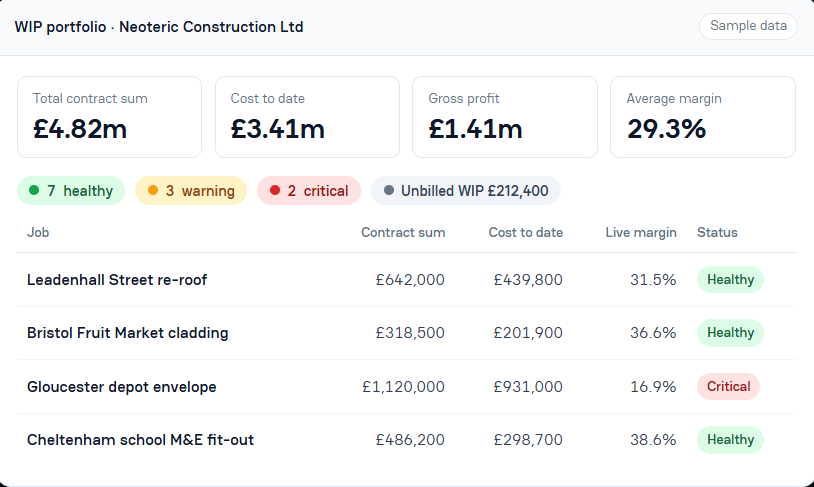
NEO ERP brings together important construction management activities such as project costing, procurement, labour, subcontractor management, plant hire, quotations and financial reporting.
It is designed to help contractors understand project costs and margins while work is still progressing, rather than discovering financial problems after completion.
The platform also supports construction-specific requirements, including CIS deductions, valuations, retentions and integration with accounting platforms such as Xero and QuickBooks.
Alongside ERP solutions, Neoteric Digital provides software development and system integration services, helping organisations explore technology improvements that suit their existing operations.
Our objective is straightforward: help businesses become more efficient without introducing unnecessary complexity.
How to Choose the Right ERP Software
Selecting ERP software should begin with understanding the problems you want to solve.
Consider which activities consume the most administrative time, where information is duplicated and which processes lack visibility.
It is also important to assess implementation costs, staff training, software integrations, data security, ongoing support and future scalability.
Before committing to a platform, request a demonstration using examples from your own business. This helps establish whether the software supports your actual working practices.
A successful ERP implementation requires more than technology. Clear objectives, accurate data and employee involvement are equally important.
Discover how Neoteric Digital can support your business through ERP software services or contact our team to discuss your requirements.
Frequently Asked Questions (FAQs)
1. What is ERP software in simple terms?
ERP software is a business management system that connects important activities such as finance, purchasing, inventory, employees and projects. It helps organisations manage information from one central platform, reducing duplicated work and improving coordination.
2. What are the main benefits of using ERP software?
The main benefits include improved efficiency, reduced administrative work, better financial visibility, stronger communication and more accurate reporting. ERP can also help businesses control costs and manage growth more effectively.
3. Is ERP software suitable for small businesses?
Yes. ERP software can benefit small and medium-sized businesses, particularly those managing growing workloads or struggling with disconnected systems. The most suitable solution depends on company size, operational requirements and available budget.
4. Can ERP software integrate with existing accounting or business systems?
Many ERP solutions support integration with existing applications, although compatibility depends on the systems involved. For example, NEO ERP is designed to support integration with Xero and QuickBooks. Businesses can assess integration options before deciding whether existing software needs replacing.
Leave a Reply